Overview
Overview
Duration
Duration
Aug 2024 - May 2025
Aug 2024 - May 2025
Team
Team
2 Senior Product Designer
1 Product Manager
1 Business Analyst
2 Senior Product Designer
1 Product Manager
1 Business Analyst
My Role
My Role
Led the end-to-end redesign of the Form Builder and Construction Setup Flow & multiple design initiatives to streamline and scale UX across the product.
My role also focused on collaborating with PMs to align design decisions on rollout phases and ensure design consistency across the evolving system.
Led the end-to-end redesign of the Form Builder and Construction Setup Flow & multiple design initiatives to streamline and scale UX across the product.
My role also focused on collaborating with PMs to align design decisions on rollout phases and ensure design consistency across the evolving system.
Anticipated Impact
Anticipated Impact
50%
50%
50%
Reduced support dependency
Reduced support dependency
Reduced support dependency
70%
70%
70%
Increased Completion Rate
Increased Completion Rate
Increased Completion Rate
80%
80%
80%
Anticipated Lower UI Bug Rate
Anticipated Lower UI Bug Rate
Anticipated Lower UI Bug Rate
Background
Background
Inncircles is a B2B construction management platform with data-heavy workflows built for contractors, project managers, and on-site engineers to streamline end-to-end project workflows, from managing vendors and materials to tracking approvals and site logs.
It aims to simplify collaboration, reduce errors & improve visibility across all stages of a construction project.
Inncircles is a B2B construction management platform with data-heavy workflows built for contractors, project managers, and on-site engineers to streamline end-to-end project workflows, from managing vendors and materials to tracking approvals and site logs.
It aims to simplify collaboration, reduce errors & improve visibility across all stages of a construction project.
Challenge
Challenge
While the product supported powerful functionality, it was weighed down by an outdated legacy interface that made even basic tasks difficult to complete without help. Many enterprise clients found it unintuitive, leading to heavy reliance on our internal support team to set things up manually.
While the product supported powerful functionality, it was weighed down by an outdated legacy interface that made even basic tasks difficult to complete without help. Many enterprise clients found it unintuitive, leading to heavy reliance on our internal support team to set things up manually.
While the product supported powerful functionality, it was weighed down by an outdated legacy interface that made even basic tasks difficult to complete without help. Many enterprise clients found it unintuitive, leading to heavy reliance on our internal support team to set things up manually.
The platform had grown feature-rich but experience-poor.
Users (especially first-timers) had no sense of guidance or feedback.
Design debt made onboarding hard, and retention harder.
The business wanted to increase client self-sufficiency and scale faster with lower support costs.
The platform had grown feature-rich but experience-poor.
Users (especially first-timers) had no sense of guidance or feedback.
Design debt made onboarding hard, and retention harder.
The business wanted to increase client self-sufficiency and scale faster with lower support costs.
The platform had grown feature-rich but experience-poor.
Users (especially first-timers) had no sense of guidance or feedback.
Design debt made onboarding hard, and retention harder.
The business wanted to increase client self-sufficiency and scale faster with lower support costs.
The beginning - Why was there a need to Revamp?
The beginning - Why was there a need to Revamp?
After joining the team, I conducted a heuristic audit across 12 core flows and identified core usability breakdowns across the platform: inconsistent patterns, poor information hierarchy, lack of modular components & confusing workflows.
After joining the team, I conducted a heuristic audit across 12 core flows and identified core usability breakdowns across the platform: inconsistent patterns, poor information hierarchy, lack of modular components & confusing workflows.
After joining the team, I identified core usability breakdowns across the platform: inconsistent patterns, poor information hierarchy, lack of modular components & confusing workflows.
The goal wasn’t just to “modernise” the look—but to rebuild the platform from a systems thinking and logic-first lens.
Goals
Goals
Improve product usability for both new and power users
Improve product usability for both new and power users
Modularize the design system for scalable implementation
Modularize the design system for scalable implementation
Enable self-serve flows and reduce dependency on support
Enable self-serve flows and reduce dependency on support
Handle edge cases gracefully without cluttering base flows
Handle edge cases gracefully without cluttering base flows
Create trust through predictability and visual clarity
Create trust through predictability and visual clarity
Rebuild the platform from a systems-thinking & logic-first lens.
Rebuild the platform from a systems-thinking & logic-first lens.
Over the next sections, I’ll walkthrough the major revamp initiatives I led and designed:
Over the next sections, I’ll walkthrough the major revamp initiatives I led and designed:
Click on the below cards to go to these sections directly
Redesigning the Form Builder
Redesigning the Form Builder
In construction management, forms are central in workflows like RFIs, inspections, material requests, safety checklists and construction teams want these forms tailored to their process. But our legacy form setup was static and required dev intervention for even small changes. This slowed down users, reduced flexibility for teams in the field, and increased support load.
In construction management, forms are central in workflows like RFIs, inspections, material requests, safety checklists and construction teams want these forms tailored to their process. But our legacy form setup was static and required dev intervention for even small changes. This slowed down users, reduced flexibility for teams in the field, and increased support load.
In construction management, forms are central in workflows like RFIs, inspections, material requests, safety checklists and construction teams want these forms tailored to their process. But our legacy form setup was static and required dev intervention for even small changes. This slowed down users, reduced flexibility for teams in the field, and increased support load.
However, the existing form builder had inconsistent, hard-to-maintain patterns scattered across modules.
Each team had built its own variant to solve local needs, leading to:
Visual and behavioral inconsistency
Had a rigid, one-size-fits-all layout
Outdated UI with poor hierarchy and no real-time feedback
Required devs to hardcode conditional logic, wasting time and blocking clients
However, the existing form builder had inconsistent, hard-to-maintain patterns scattered across modules.
Each team had built its own variant to solve local needs, leading to:
Visual and behavioral inconsistency
Had a rigid, one-size-fits-all layout
Outdated UI with poor hierarchy and no real-time feedback
Required devs to hardcode conditional logic, wasting time and blocking clients
However, the existing form builder had inconsistent, hard-to-maintain patterns scattered across modules.
Each team had built its own variant to solve local needs, leading to:
Visual and behavioral inconsistency
Had a rigid, one-size-fits-all layout
Outdated UI with poor hierarchy and no real-time feedback
Required devs to hardcode conditional logic, wasting time and blocking clients
Existing Flow
Experiencing the form firsthand
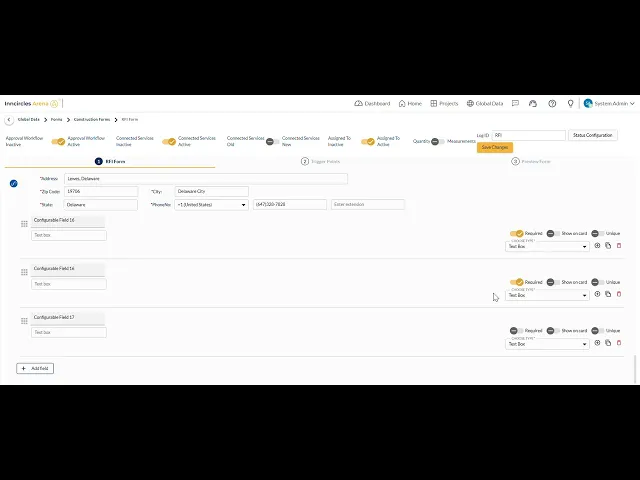
My first step was experiencing the system as a user would. So I tried setting up forms myself using the existing system. It quickly became clear why clients were frustrated:
My first step was experiencing the system as a user would. So I tried setting up forms myself using the existing system. It quickly became clear why clients were frustrated:
Usability Issues
Usability Issues
Everything was on one screen, with no hierarchy or guidance.
The top bar was littered with technical toggles (approval workflow, connected services) that made sense to devs but confused users.
"Configurable Fields" was just a long list of boxes with tiny toggles-
no sense of layout or flow.Field properties (required, unique, show as badge) were crammed horizontally with no clear grouping.
Changing a field type mid-way (like from Select to Date) broke the entire field.
There was no preview for how it would actually look on mobile or tablet.
Everything was on one screen, with no hierarchy or guidance.
The top bar was littered with technical toggles (approval workflow, connected services) that made sense to devs but confused users.
"Configurable Fields" was just a long list of boxes with tiny toggles-
no sense of layout or flow.Field properties (required, unique, show as badge) were crammed horizontally with no clear grouping.
Changing a field type mid-way (like from Select to Date) broke the entire field.
There was no preview for how it would actually look on mobile or tablet.
Everything was on one screen, with no hierarchy or guidance.
The top bar was littered with technical toggles (approval workflow, connected services) that made sense to devs but confused users.
"Configurable Fields" was just a long list of boxes with tiny toggles-
no sense of layout or flow.Field properties (required, unique, show as badge) were crammed horizontally with no clear grouping.
Changing a field type mid-way (like from Select to Date) broke the entire field.
There was no preview for how it would actually look on mobile or tablet.
What users said
What users said
What users said
Usability Session Feedback
I have to open multiple dropdowns for options I use daily. It’s tiring and repetitive
Client Onboarding Session
"I have to open multiple dropdowns for options I use daily. It’s tiring and repetitive"
Usability Session Feedback
"To add one sub-entity, I go through so many to start editing a form & multiple confirmations, I lose context & it’s exhausting"
Support Tickets
"I tried using it on my tablet at the site, but it’s not responsive. I have to scroll endlessly"
Support Tickets
"I tried using it on my tablet at the site, but it’s not responsive. I have to scroll endlessly"
I benchmarked leading form tools like Jotform and Typeform and construction-focused platforms like Procore to understand what patterns users had already internalised and where those patterns broke down for construction-specific needs.
Jotform showed me how powerful a drag-and-drop canvas could be when paired with a persistent field library, users never had to hunt for what they needed; everything was visible and accessible in one place.
Typeform, on the other hand, taught me what not to do for this context: its one-question-at-a-time flow works beautifully for consumer surveys, but construction forms are reviewed, referenced, and filled in non-linear ways on-site. A linear wizard would have been the wrong model entirely for our users.
Procore was the most instructive; it showed me that construction professionals are comfortable with complex, data-dense interfaces only when the hierarchy is predictable and the labels match their domain language.
Where Procore fell short was in configurability: admins couldn't change field behaviour without engineering support, which was exactly the problem we were solving
I benchmarked leading form tools like Jotform and Typeform and construction-focused platforms like Procore to understand what patterns users had already internalised and where those patterns broke down for construction-specific needs.
Jotform showed me how powerful a drag-and-drop canvas could be when paired with a persistent field library, users never had to hunt for what they needed; everything was visible and accessible in one place.
Typeform, on the other hand, taught me what not to do for this context: its one-question-at-a-time flow works beautifully for consumer surveys, but construction forms are reviewed, referenced, and filled in non-linear ways on-site. A linear wizard would have been the wrong model entirely for our users.
Procore was the most instructive, it showed me that construction professionals are comfortable with complex, data-dense interfaces, but only when the hierarchy is predictable and the labels match their domain language.
Where Procore fell short was in configurability: admins couldn't change field behaviour without engineering support, which was exactly the problem we were solving
📌 Key Insights
📌 Key Insights
📌 Key Insights
The form setup didn’t mirror real-world construction workflows
The form setup didn’t mirror real-world construction workflows
The form setup didn’t mirror real-world construction workflows
Users needed clarity and guidance, not more data entry.
Users needed clarity and guidance, not more data entry.
Users needed clarity and guidance, not more data entry.
Efficiency was compromised by repetitive & multi-step interactions.
Efficiency was compromised by repetitive & multi-step interactions.
Efficiency was compromised by repetitive & multi-step interactions.
Feedback loops were missing, reducing trust and confidence.
Feedback loops were missing, reducing trust and confidence.
Feedback loops were missing, reducing trust and confidence.
The interface is not scalable for large project data.
The interface is not scalable for large project data.
The interface is not scalable for large project data.
The experience lacked consistency across modules and interactions.
The experience lacked consistency across modules and interactions.
The experience lacked consistency across modules and interactions.
Reframing the problem
Reframing the problem
How might we empower non-technical users to build complex, responsive forms with confidence without sacrificing construction-related workflows?
How might we empower non-technical users to build complex, responsive forms with confidence without sacrificing construction-related workflows?
How might we empower non-technical users to build complex, responsive forms with confidence without sacrificing construction-related workflows?
Translating Insights into Solution
Translating Insights into Solution
All of these insights made it clear that we didn’t just need to improve the visuals, we needed to fundamentally rethink how users create, edit, and preview forms making the entire experience intuitive, flexible, and trustworthy.
Based on what we learned from users, stakeholders, and our own audit, I worked with the PM and engineering team to define key design goals for the new Form Builder:
All of these insights made it clear that we didn’t just need to improve the visuals, we needed to fundamentally rethink how users create, edit, and preview forms making the entire experience intuitive, flexible, and trustworthy.
Based on what we learned from users, stakeholders, and our own audit, I worked with the PM and engineering team to define key design goals for the new Form Builder:
All of these insights made it clear that we didn’t just need to improve the visuals, we needed to fundamentally rethink how users create, edit, and preview forms making the entire experience intuitive, flexible, and trustworthy.
Based on what we learned from users, stakeholders, and our own audit, I worked with the PM and engineering team to define key design goals for the new Form Builder:
Design Principles
Design Principles
Design Principles
Users should see the form exactly as it will appear
Users should see the form exactly as it will appear
Users should see the form exactly as it will appear
Guided Flexibility → Options to help without overwhelming by default.
Guided Flexibility → Options to help without overwhelming by default.
Guided Flexibility → Options to help without overwhelming by default.
Responsive by Design → Preview and adapt to all device sizes.
Responsive by Design → Preview and adapt to all device sizes.
Responsive by Design → Preview and adapt to all device sizes.
Contextual Editing → Properties appear when and where you need them.
Contextual Editing → Properties appear when and where you need them.
Contextual Editing → Properties appear when and where you need them.
Immediate Feedback → Every change instantly visible on canvas and in preview.
Immediate Feedback → Every change instantly visible on canvas and in preview.
Immediate Feedback → Every change instantly visible on canvas and in preview.
Create trust through predictability and visual clarity
Create trust through predictability and visual clarity
Create trust through predictability and visual clarity
With these in place, I moved on to translating them into a concrete, user-friendly solution.
Below, I’ll walk through how I designed the new Form Builder’s core architecture, interactions, and flows to deliver on these promises.
With these in place, I moved on to translating them into a concrete, user-friendly solution.
Below, I’ll walk through how I designed the new Form Builder’s core architecture, interactions, and flows to deliver on these promises.
With these in place, I moved on to translating them into a concrete, user-friendly solution.
Below, I’ll walk through how I designed the new Form Builder’s core architecture, interactions, and flows to deliver on these promises.
Solution
Solution
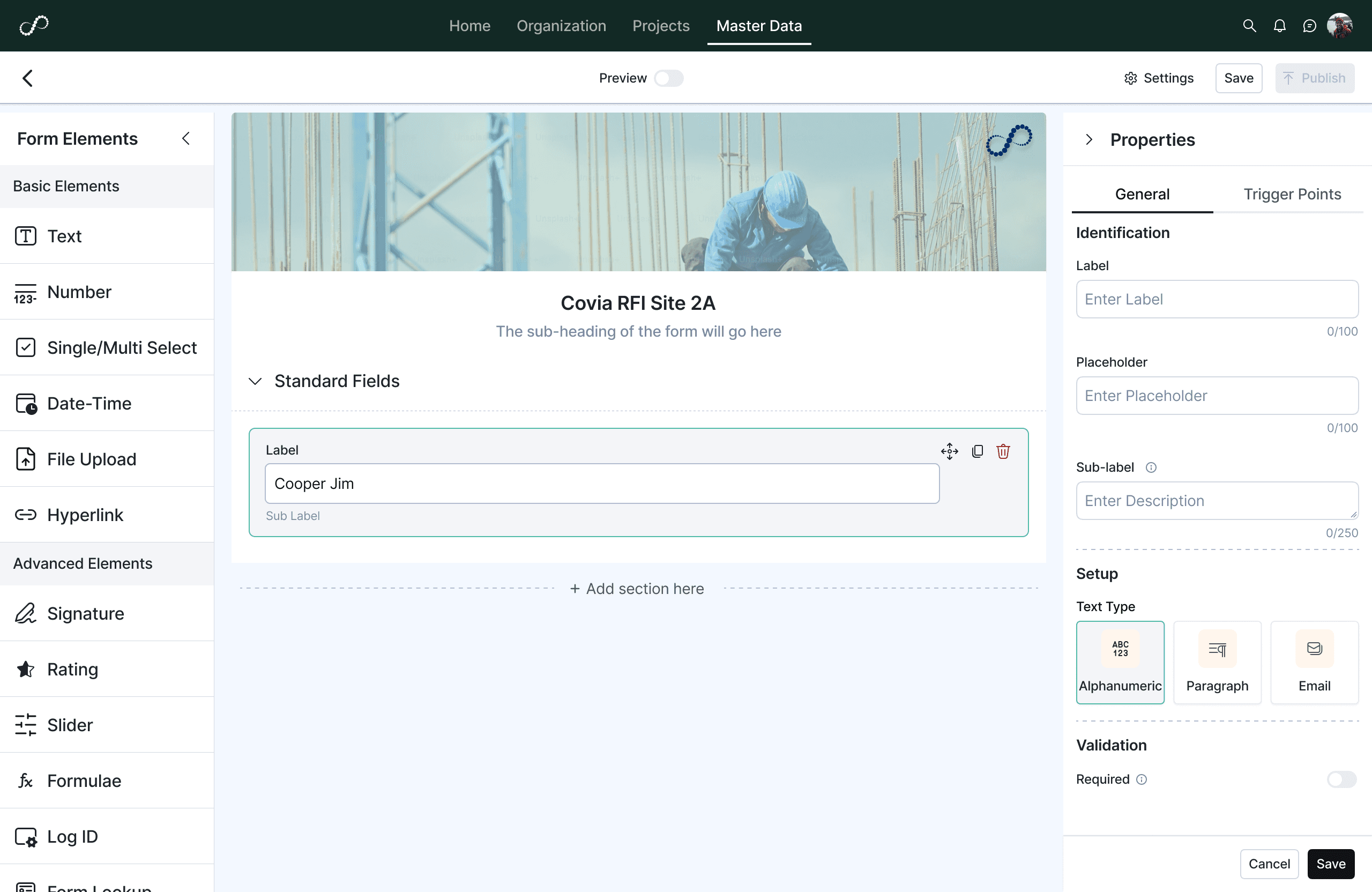
My core idea was to shift from a static, developer-focused form definition page to a dynamic, visual, WYSIWYG (what you see is what you get) builder one that gave users full control while guiding them with a clear structure. That landed me on a three-panel layout:
This let users focus on one task at a time without overwhelming them.
My core idea was to shift from a static, developer-focused form definition page to a dynamic, visual, WYSIWYG (what you see is what you get) builder one that gave users full control while guiding them with a clear structure. That landed me on a three-panel layout:
This let users focus on one task at a time without overwhelming them.
My core idea was to shift from a static, developer-focused form definition page to a dynamic, visual, WYSIWYG (what you see is what you get) builder one that gave users full control while guiding them with a clear structure. That landed me on a three-panel layout:
This let users focus on one task at a time without overwhelming them.
Left - Fields Library
Left - Fields Library
Left
Fields Library
Center - Form canvas
Center - Form canvas
Center
Form canvas
Right- Contextual Properties Panel
Right- Contextual Properties Panel
Right
Contextual Properties
Form elements & Properties
Form elements & Properties
Form elements contain all the fields library segregated by
Basic, Advanced, Section and Arena Field, which is specific to fields specially used by Inncircles and will grow in future releases.
Form elements contain all the fields library segregated by
Basic, Advanced, Section and Arena Field, which is specific to fields specially used by Inncircles and will grow in future releases.
Form elements contain all the fields library segregated by
Basic, Advanced, Section and Arena Field, which is specific to fields specially used by Inncircles and will grow in future releases.

Text
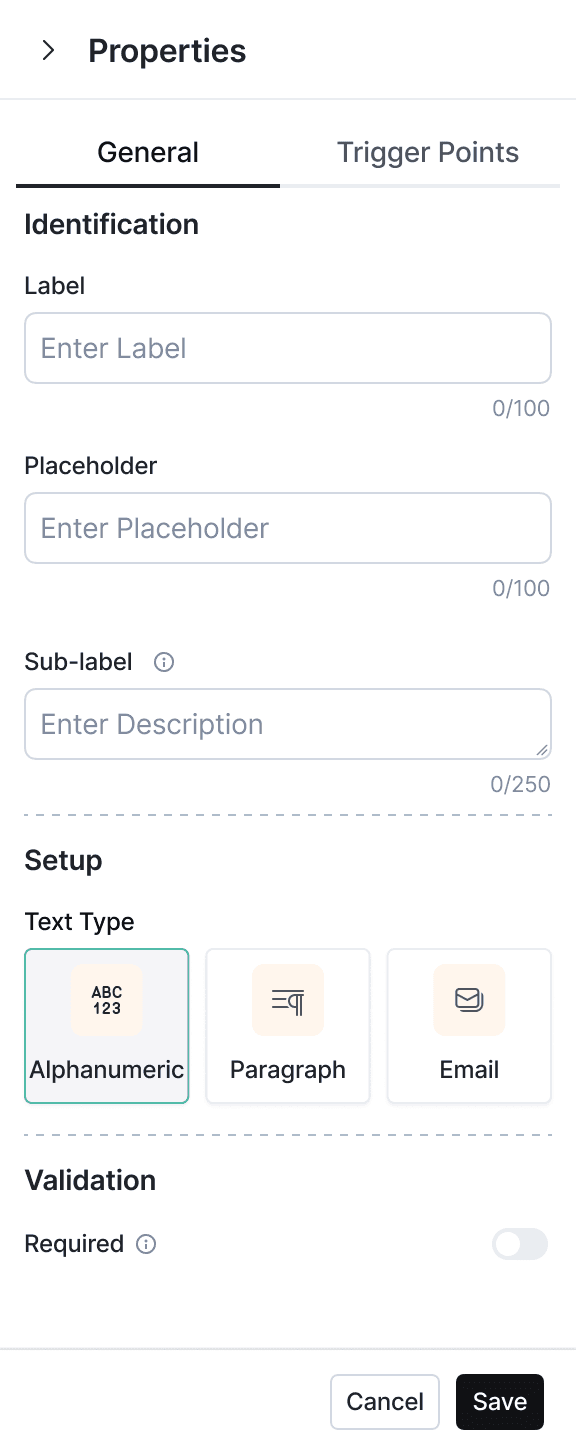
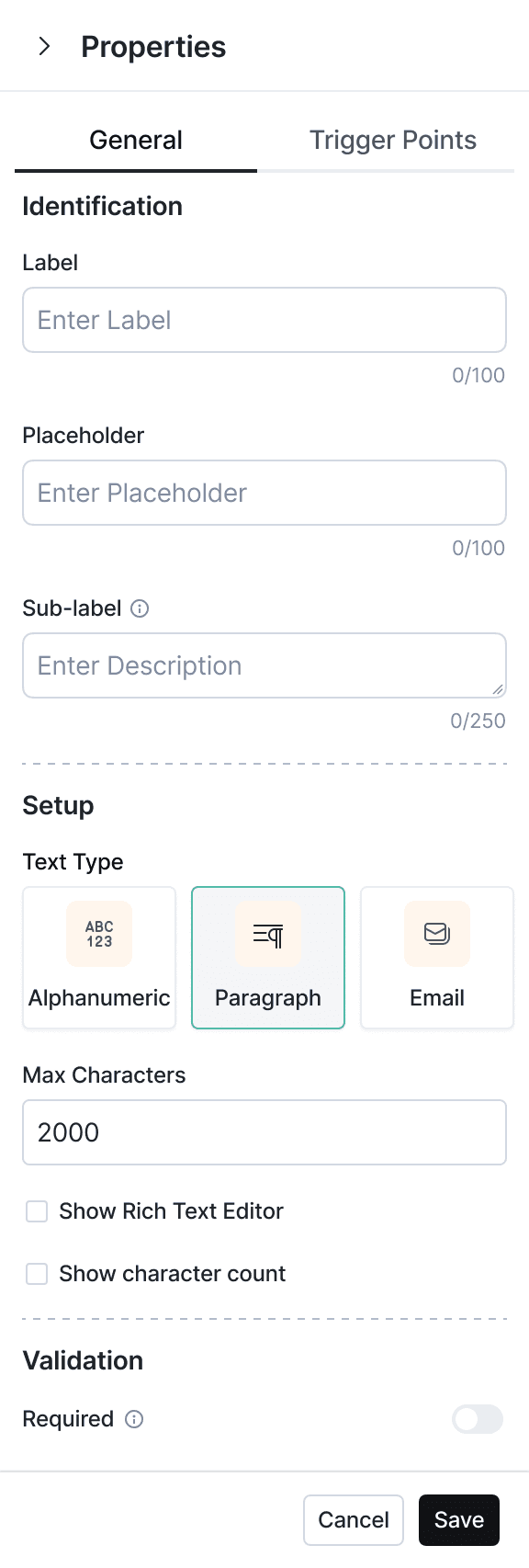
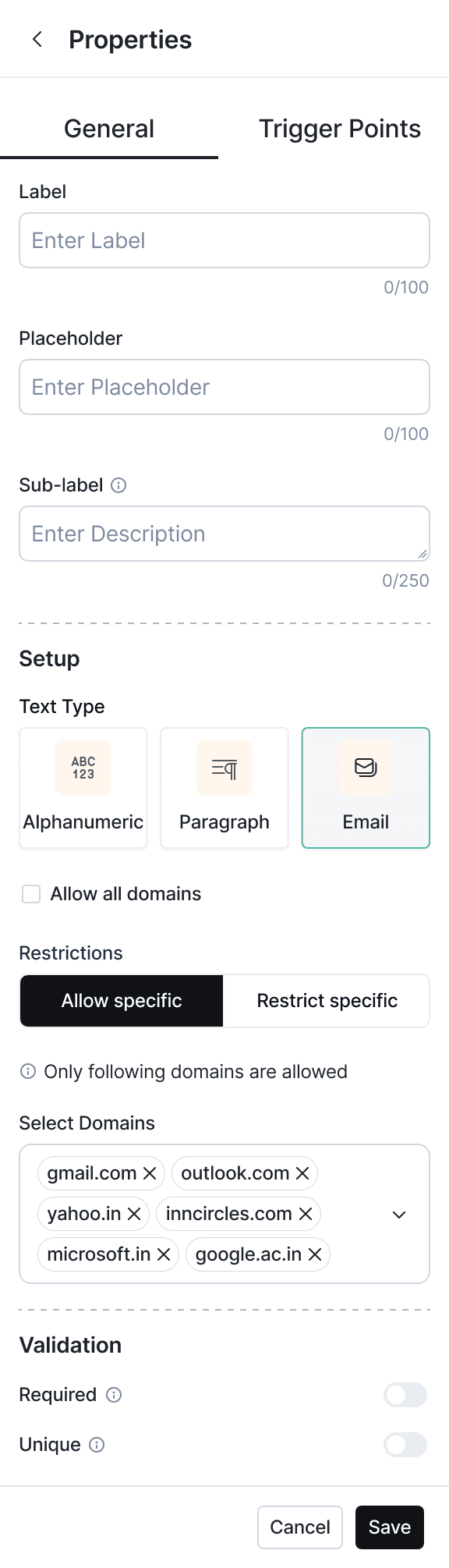
The Text property in the new form builder supports :
Alphanumeric – simple free text input for names, IDs, notes.
Paragraph – long-form responses with optional rich text editing and max character limits.
Email – validated email input with advanced domain restriction rules.
Clear, type-specific setup with intuitive controls (max characters, domain rules) ensures better data integrity, faster error-free creation, and higher client confidence.
The Text property in the new form builder supports :
Alphanumeric – simple free text input for names, IDs, notes.
Paragraph – long-form responses with optional rich text editing and max character limits.
Email – validated email input with advanced domain restriction rules.
Clear, type-specific setup with intuitive controls (max characters, domain rules) ensures better data integrity, faster error-free creation, and higher client confidence.
The Text property in the new form builder supports :
Alphanumeric – simple free text input for names, IDs, notes.
Paragraph – long-form responses with optional rich text editing and max character limits.
Email – validated email input with advanced domain restriction rules.
Clear, type-specific setup with intuitive controls (max characters, domain rules) ensures better data integrity, faster error-free creation, and higher client confidence.
Number
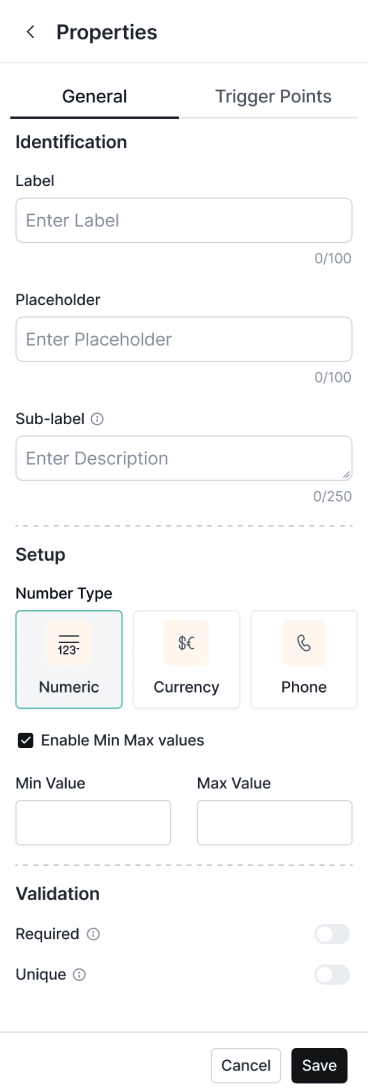
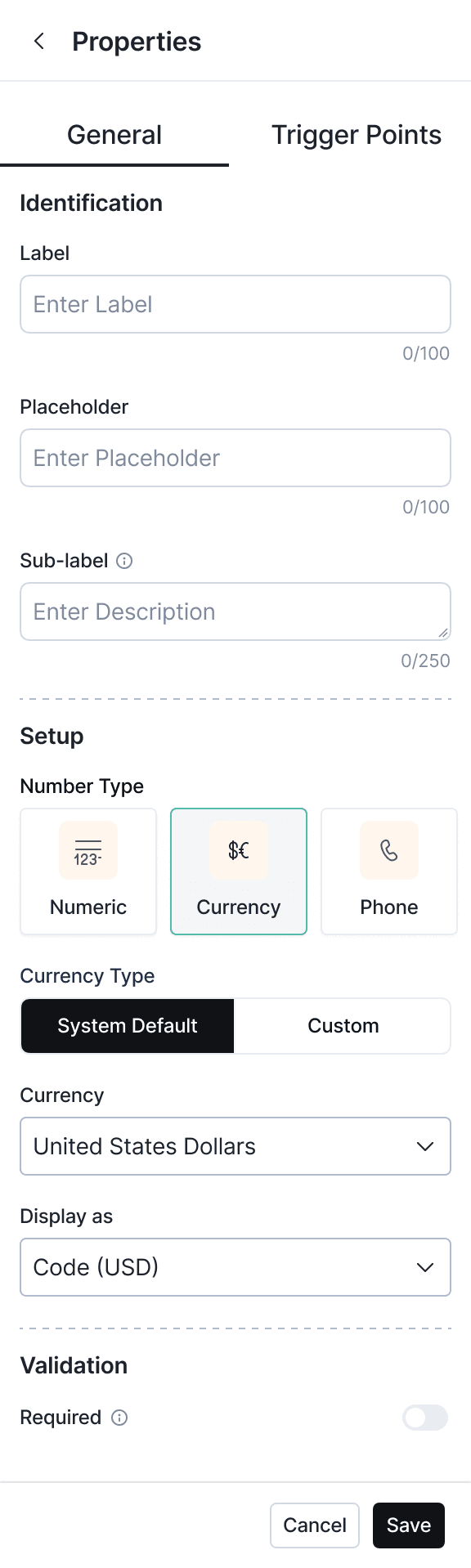
Includes Numeric, Currency, and Phone types with options for min/max limits, currency selection, and formatting.
Helps teams capture validated, precise, and region-specific data easily while reducing manual errors and setup complexity.
Includes Numeric, Currency, and Phone types with options for min/max limits, currency selection, and formatting.
Helps teams capture validated, precise, and region-specific data easily while reducing manual errors and setup complexity.
Date
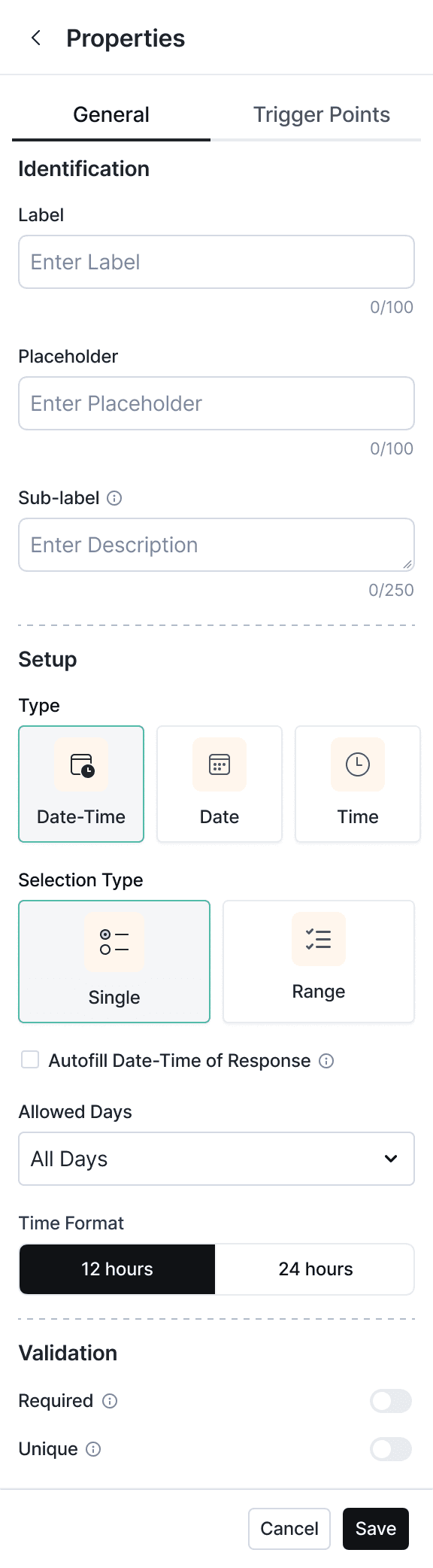
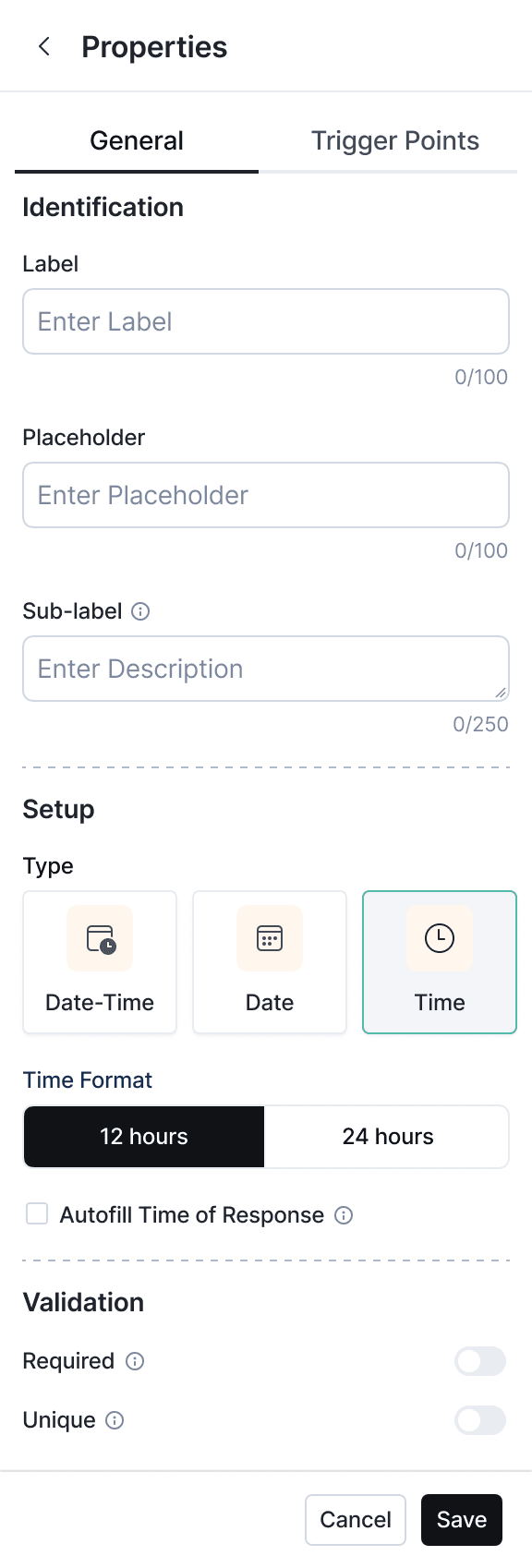
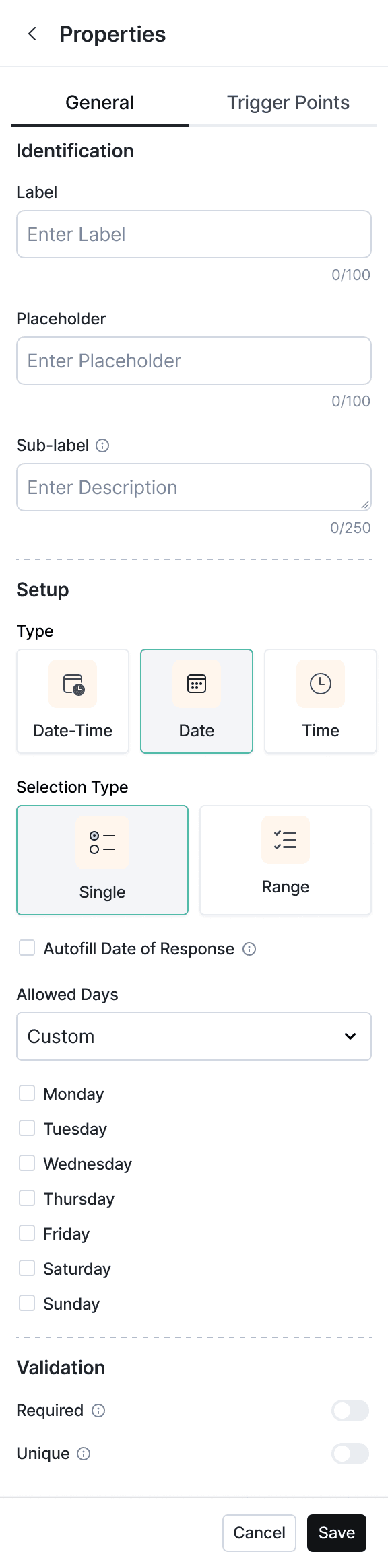
Supports Date, Time, and Date-Time inputs with single/range selection, time formats, and allowed days.
These granular controls are especially useful for scheduling tasks, setting deadlines, or capturing timestamps in workflows. By tailoring input to the context, it improves data consistency and eliminates back-and-forth for corrections.
Supports Date, Time, and Date-Time inputs with single/range selection, time formats, and allowed days.
These granular controls are especially useful for scheduling tasks, setting deadlines, or capturing timestamps in workflows. By tailoring input to the context, it improves data consistency and eliminates back-and-forth for corrections.
Rating
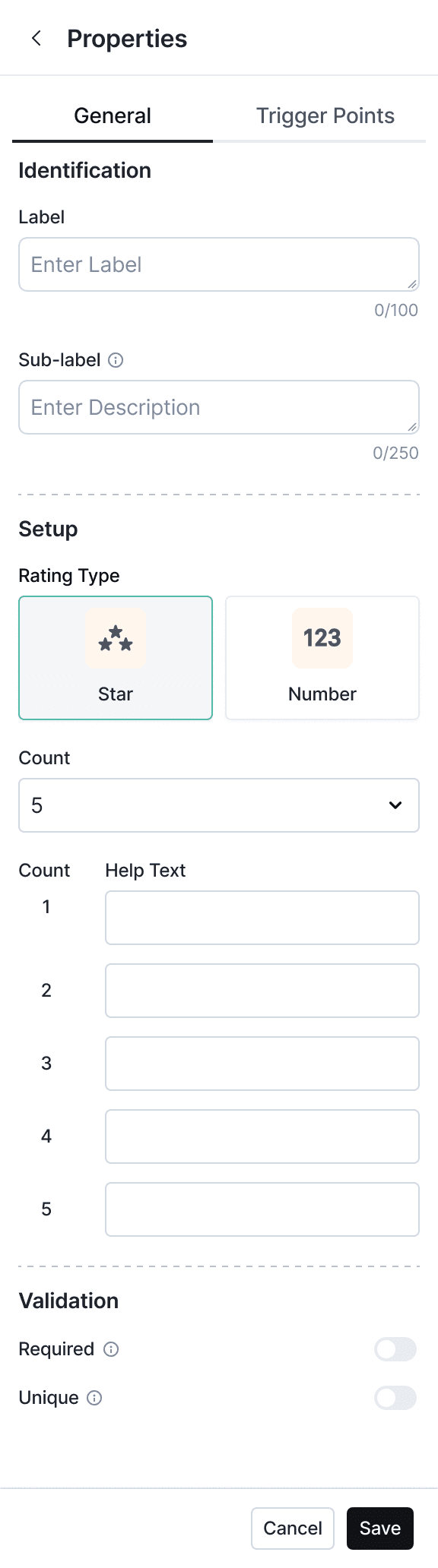
The Rating property supports both star-based and numeric scales, with customizable count and help text for each level.
By letting form creators define their own scale and guidance, it ensures responses are meaningful, consistent, and easy to interpret across teams.
The Rating property supports both star-based and numeric scales, with customizable count and help text for each level.
By letting form creators define their own scale and guidance, it ensures responses are meaningful, consistent, and easy to interpret across teams.
Form Canvas
Form Canvas
Drag Elements
Drag Elements
Drag Elements
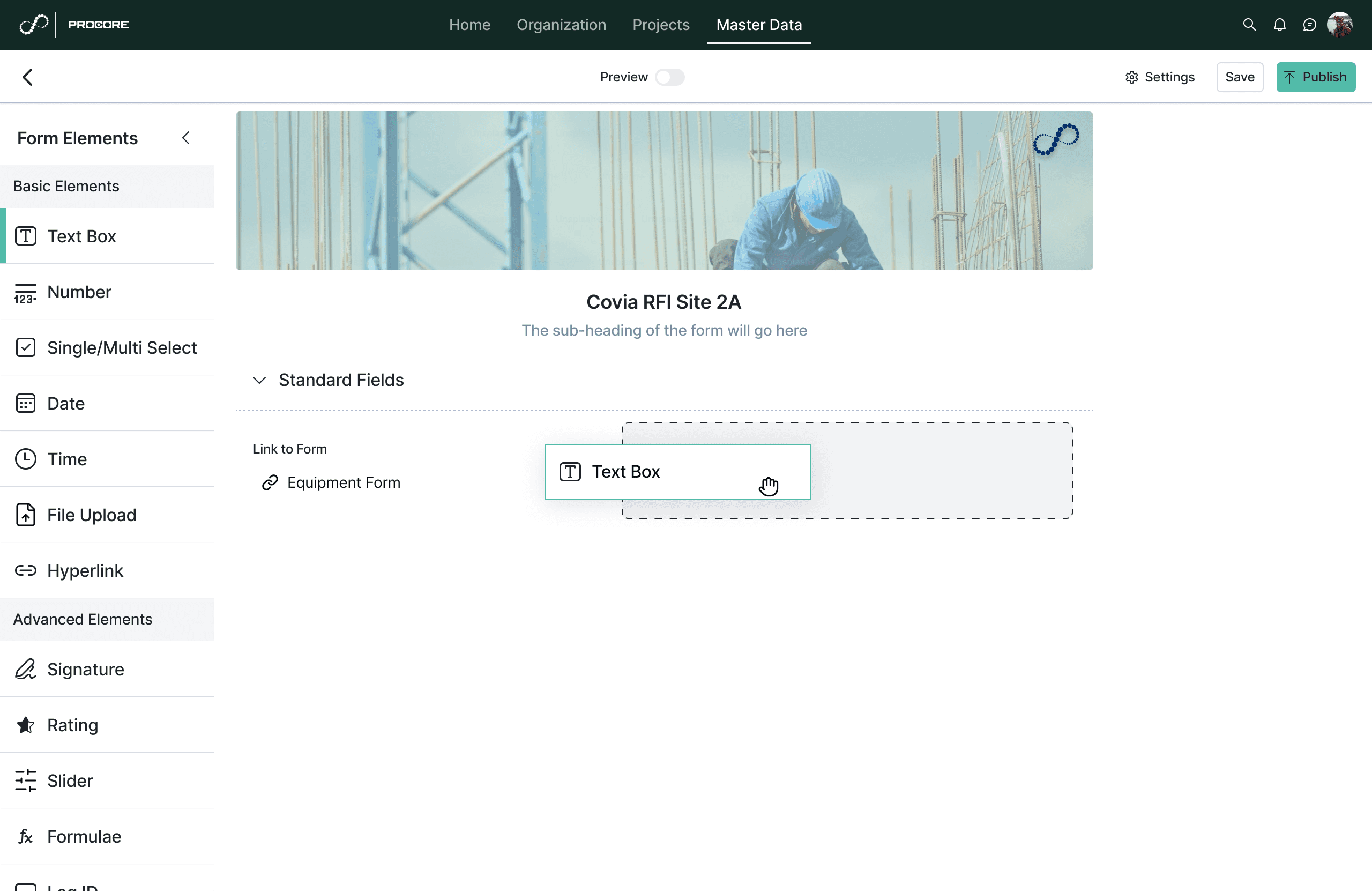
Dragging fields next to each other in a row
Dragging fields next to each other in a row
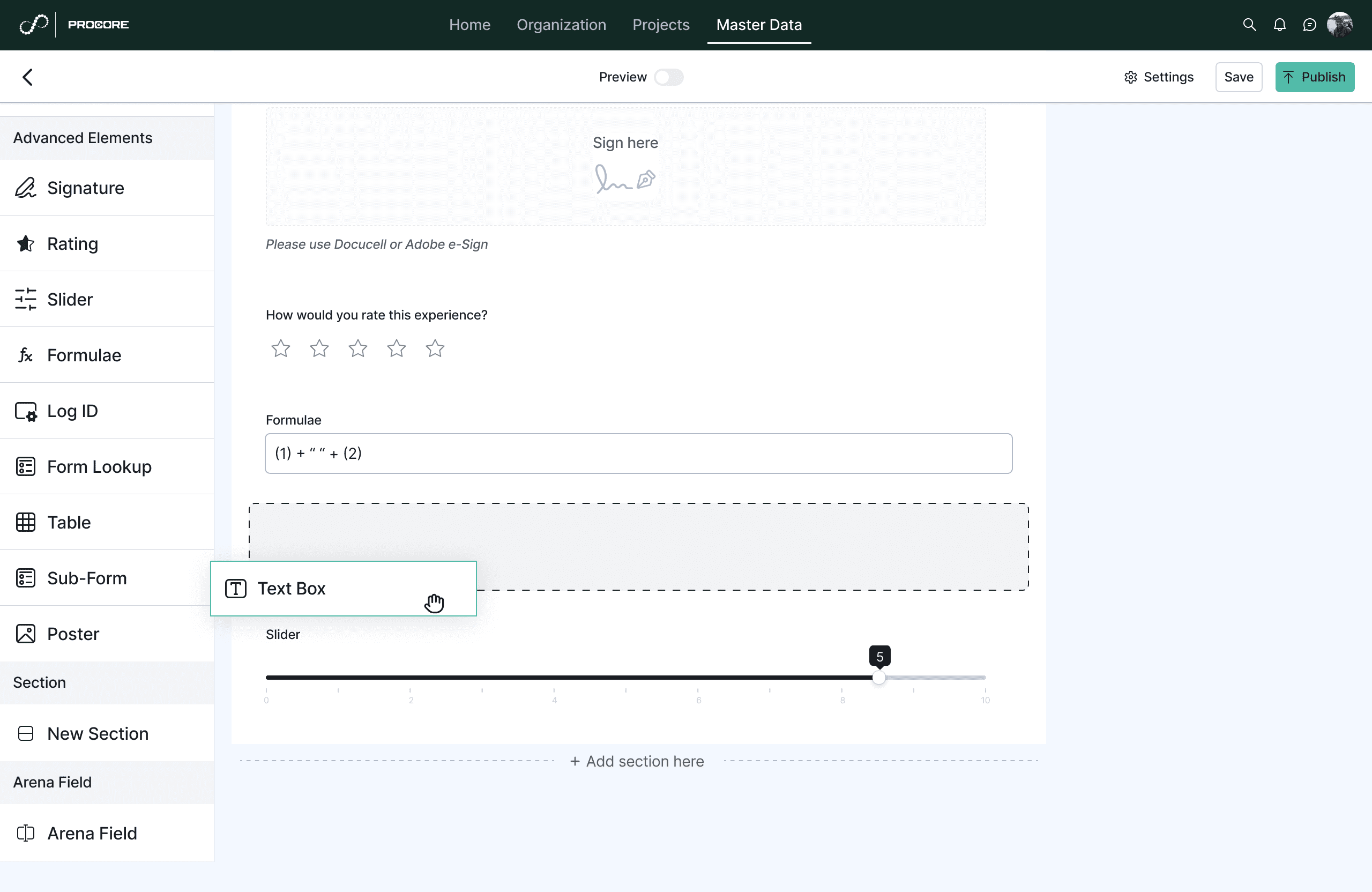
Dragging fields above/below other fields
Dragging fields above/below other fields
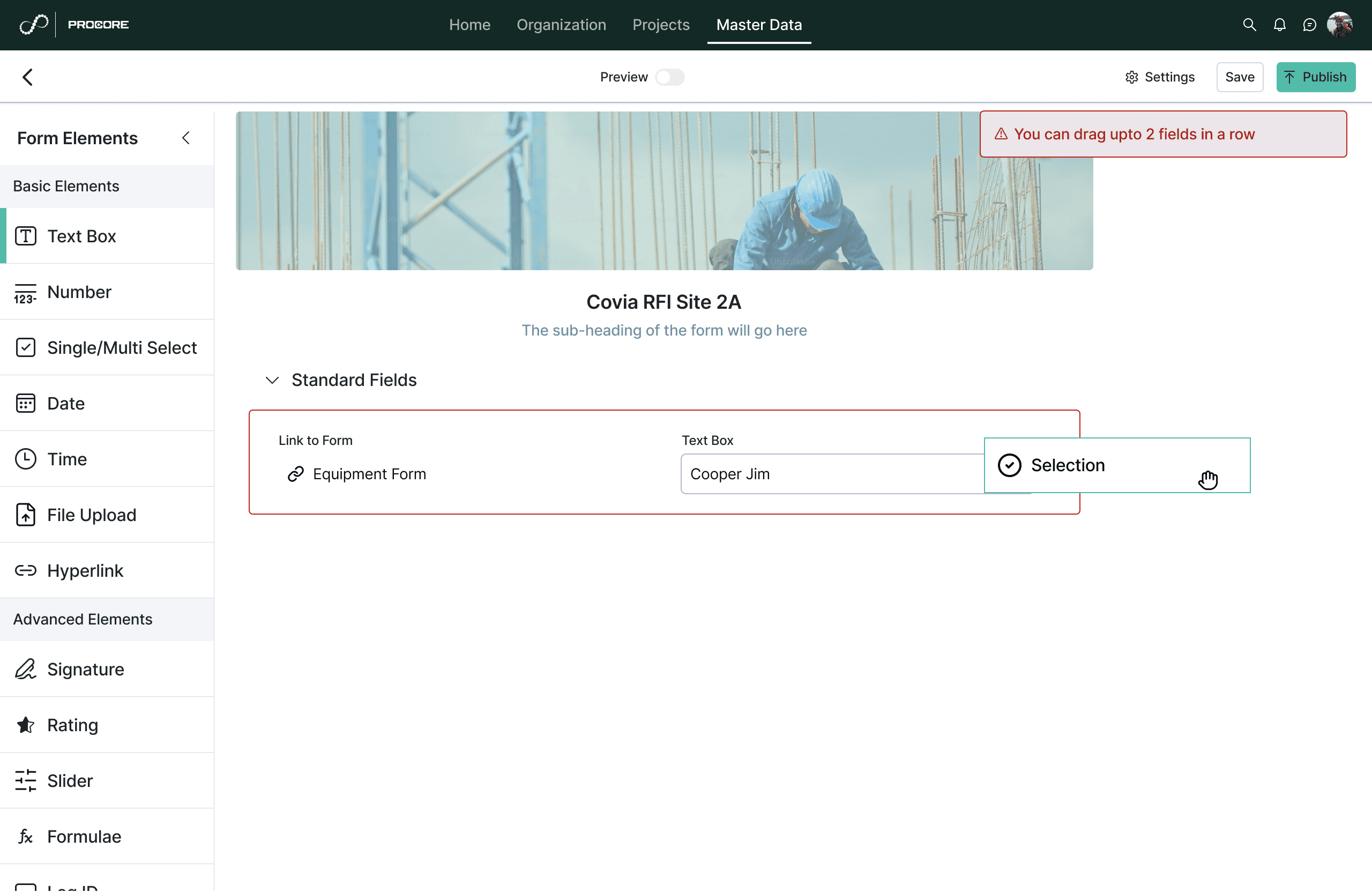
Dragging more than 2 fields in a row is restricted due to overload of data
Dragging more than 2 fields in a row is restricted due to overload of data
Preview
Preview
Preview
Shows how the form will appear in different devices
Shows how the form will appear in different devices
Settings
Settings
Settings
Configuring the form approval workflows, ID settings, themes and the thank you pages
Configuring the form approval workflows, ID settings, themes and the thank you pages
2) Construction Setup Flow
2 Construction Setup Flow
As part of Inncircles major platform revamp, I redesigned the Construction Type Setup flow, a critical but underused feature that allowed clients to configure the blueprint of their entire project.
This feature is essential for onboarding any new construction client, whether they’re managing residential, commercial, or industrial project. It determines how all site entities, work packages, activities, and materials are structured in the system.
As part of Inncircles major platform revamp, I redesigned the Construction Type Setup flow, a critical but underused feature that allowed clients to configure the blueprint of their entire project.
This feature is essential for onboarding any new construction client, whether they’re managing residential, commercial, or industrial project. It determines how all site entities, work packages, activities, and materials are structured in the system.
As part of Inncircles major platform revamp, I redesigned the Construction Type Setup flow, a critical but underused feature that allowed clients to configure the blueprint of their entire project.
This feature is essential for onboarding any new construction client, whether they’re managing residential, commercial, or industrial project. It determines how all site entities, work packages, activities, and materials are structured in the system.
Existing Flow
Existing Flow
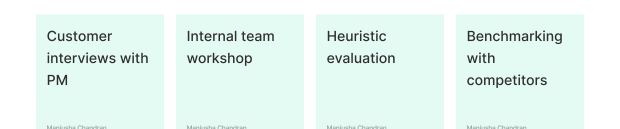
How I approached research?
How I approached research?
Whats the problem?
Whats the problem?
It was originally designed from an internal database perspective, not from a user’s mental model.
Clients had to define a level nested hierarchy
(Entity Types → Super Location Types → Location Types), then
map Activities, Work Packages, and finally
configure Materials & Labor.It immediately felt designed for engineers not for construction managers
It was originally designed from an internal database perspective, not from a user’s mental model.
Clients had to define a level nested hierarchy
(Entity Types → Super Location Types → Location Types), then
map Activities, Work Packages, and finally
configure Materials & Labor.It immediately felt designed for engineers not for construction managers
It was originally designed from an internal database perspective, not from a user’s mental model.
Clients had to define a level nested hierarchy
(Entity Types → Super Location Types → Location Types), then
map Activities, Work Packages, and finally
configure Materials & Labor.It immediately felt designed for engineers not for construction managers

As a result, clients couldn’t use it on their own. Our internal team had to manually set it up for them leading to:
As a result, clients couldn’t use it on their own. Our internal team had to manually set it up for them leading to:
As a result, clients couldn’t use it on their own. Our internal team had to manually set it up for them leading to:
Business Problem
Business Problem
Business Problem
Slower Onboarding rates
Slower Onboarding rates
Slower Onboarding rates
Higher support costs
Higher support costs
Higher support costs
📌 Key Insights
📌 Key Insights
📌 Key Insights
Cognitive Load
Users struggled to mentally model what they were building. A residential project might have 5–10 levels of hierarchy (e.g. Block-Floor-Room-Door), but our old flow showed them 3 disconnected columns with no nesting.
Cognitive Load
Users struggled to mentally model what they were building. A residential project might have 5–10 levels of hierarchy (e.g. Block-Floor-Room-Door), but our old flow showed them 3 disconnected columns with no nesting.
Cognitive Load
Users struggled to mentally model what they were building. A residential project might have 5–10 levels of hierarchy (e.g. Block-Floor-Room-Door), but our old flow showed them 3 disconnected columns with no nesting.
Lack of Guidance
Our process was split across multiple pages with no progress indicators. New users didn't know what step they were on or what was left to do.
Lack of Guidance
Our process was split across multiple pages with no progress indicators. New users didn't know what step they were on or what was left to do.
Lack of Guidance
Our process was split across multiple pages with no progress indicators. New users didn't know what step they were on or what was left to do.
Fear of Mistakes & Rework
Users worried that any mistake would ruin the project structure. No clear option to bulk edit, preview changes, or discard work.
Fear of Mistakes & Rework
Users worried that any mistake would ruin the project structure. No clear option to bulk edit, preview changes, or discard work.
Fear of Mistakes & Rework
Users worried that any mistake would ruin the project structure. No clear option to bulk edit, preview changes, or discard work.
No Learning Support
There was no contextual help or onboarding, even though construction types varied wildly between residential, commercial, and industrial projects
No Learning Support
There was no contextual help or onboarding, even though construction types varied wildly between residential, commercial, and industrial projects
No Learning Support
There was no contextual help or onboarding, even though construction types varied wildly between residential, commercial, and industrial projects
Reframing the problem
Reframing the problem
How might we help construction managers set up their project’s entire hierarchy, no matter how complex in a clear, guided, and confident way?
I realised this wasn’t just about redesigning screens, it was about translating expert domain knowledge into an understandable, usable process
How might we help construction managers set up their project’s entire hierarchy, no matter how complex in a clear, guided, and confident way?
I realised this wasn’t just about redesigning screens, it was about translating expert domain knowledge into an understandable, usable process
How might we help construction managers set up their project’s entire hierarchy, no matter how complex in a clear, guided, and confident way?
I realised this wasn’t just about redesigning screens, it was about translating expert domain knowledge into an understandable, usable process
Design Principles
Design Principles
Design Principles
Clarity
Make hierarchy visually obvious and intuitive with parent-child relationships
Clarity
Make hierarchy visually obvious and intuitive with parent-child relationships
Progressive Disclosure
Only show users what they need to do next
Progressive Disclosure
Only show users what they need to do next
Validation & Preview
Prevent errors early and let users review before publishing
Validation & Preview
Prevent errors early and let users review before publishing
Guided Setup
Step-by-step wizard that reduces cognitive load
Guided Setup
Step-by-step wizard that reduces cognitive load
Solution
Solution
I ran reviews with PMs and the business analysts to ensure feasibility for bulk operations and the structure as it was very construction domain specific flow.
I ran reviews with PMs and the business analysts to ensure feasibility for bulk operations and the structure as it was very construction domain specific flow.
I ran reviews with PMs and the business analysts to ensure feasibility for bulk operations and the structure as it was very construction domain specific flow.
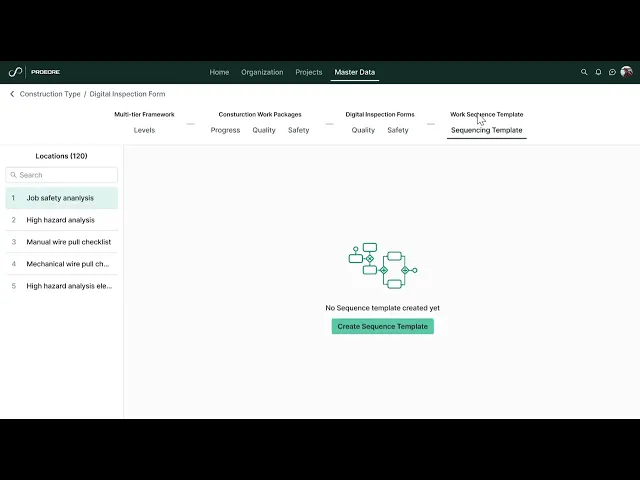
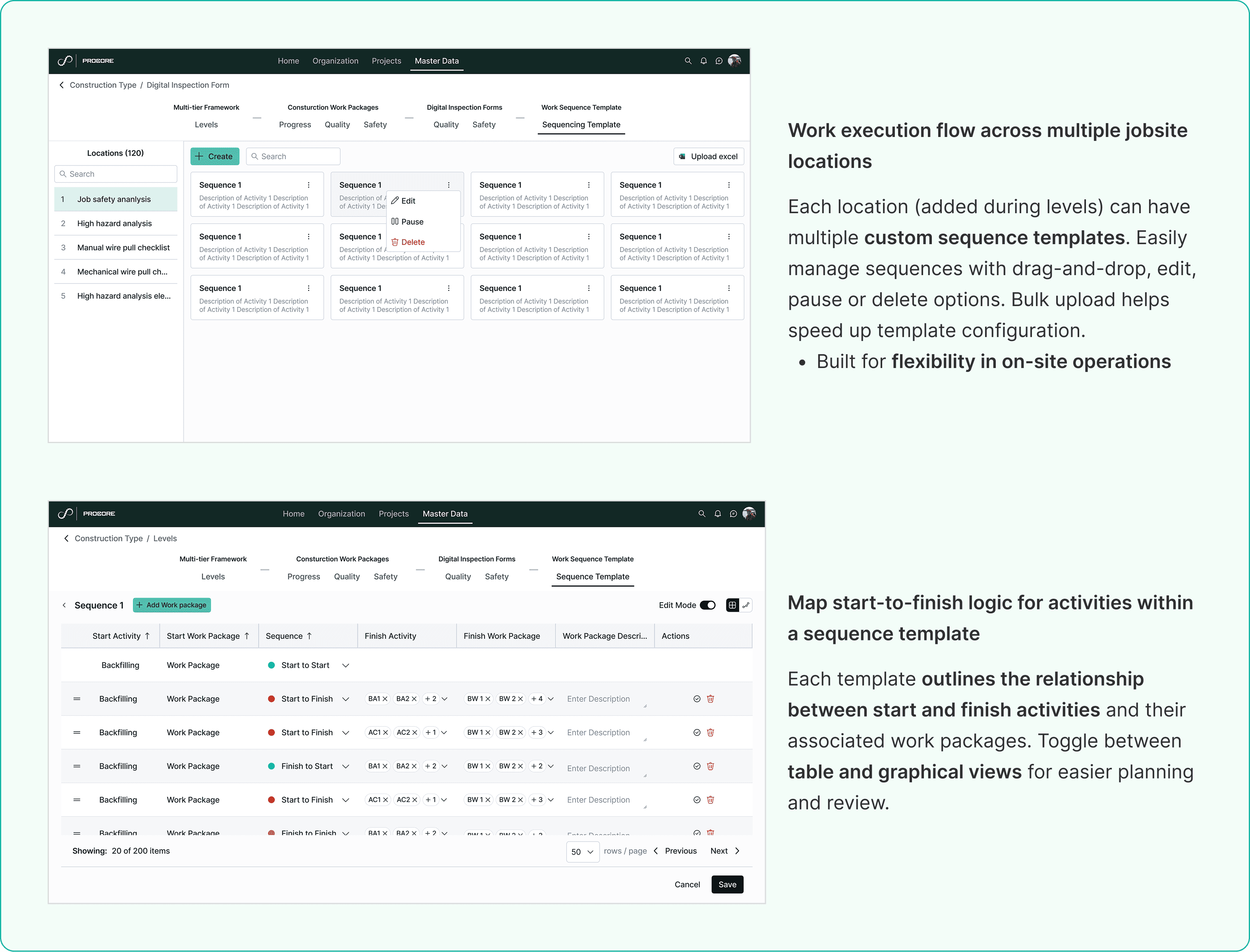
Here's a walkthrough of the redesigned flow in action — from creating a construction type to defining multi-tier hierarchies and sequence templates
What didnt go as planned
What didnt go as planned
My first approach to the Construction Setup flow was a fully guided wizard step-by-step, one decision per screen, with no way to jump ahead. It looked clean and felt logical to me. But when I walked through it with the internal onboarding team, they pushed back.
Experienced users setting up their fifth project didn't want to be hand-held through every step, the wizard that was supposed to reduce cognitive load was actually creating friction for power users who knew exactly what they needed. I had over-indexed on new user anxiety and underweighted the power user case.
I went back and redesigned the flow to support both modes: a guided path for first-timers and a more direct, collapsable view for returning users. It added one week to the timeline but produced a significantly stronger solution.
Step 1 - Create Construction Type
Step 1 - Create Construction Type
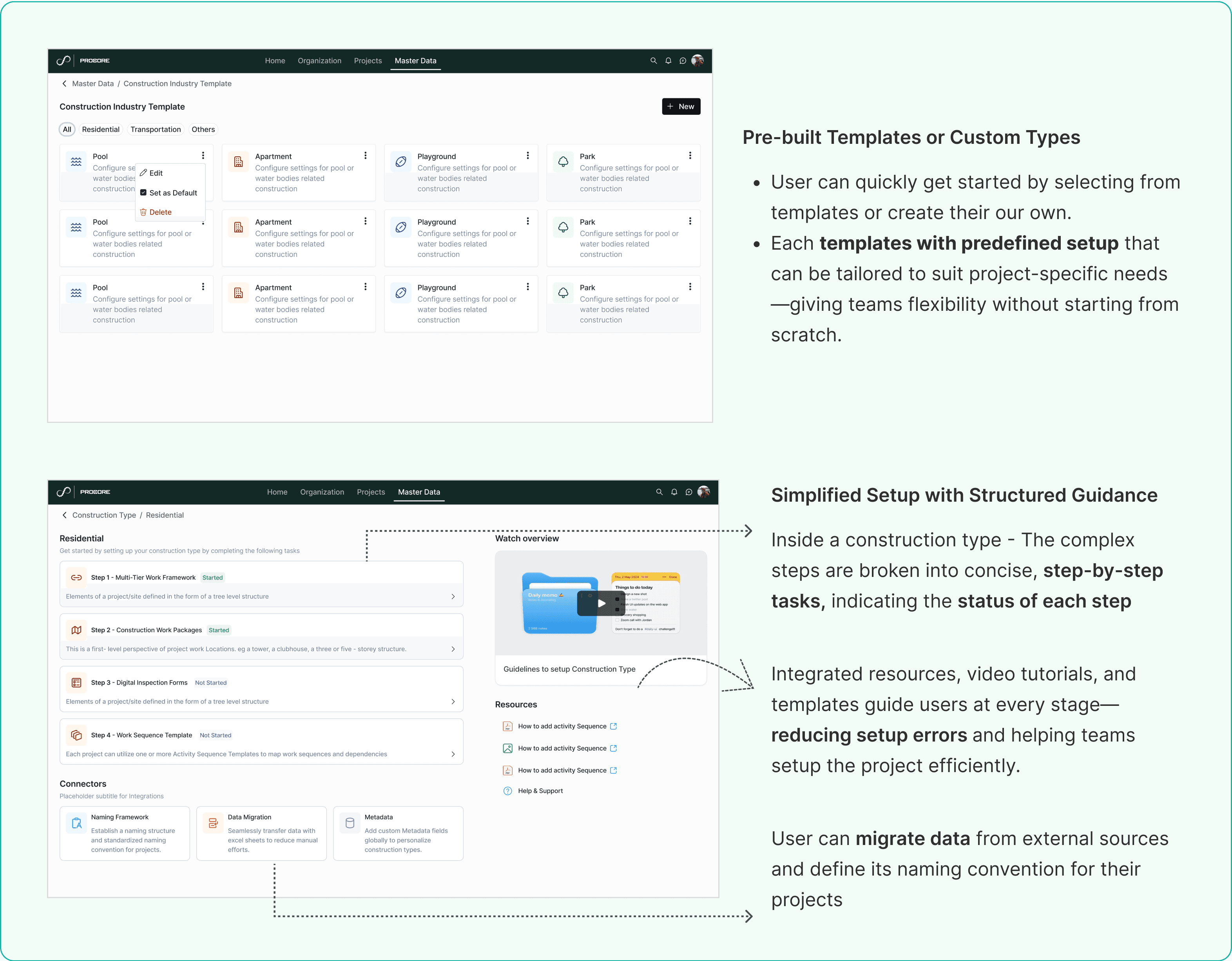
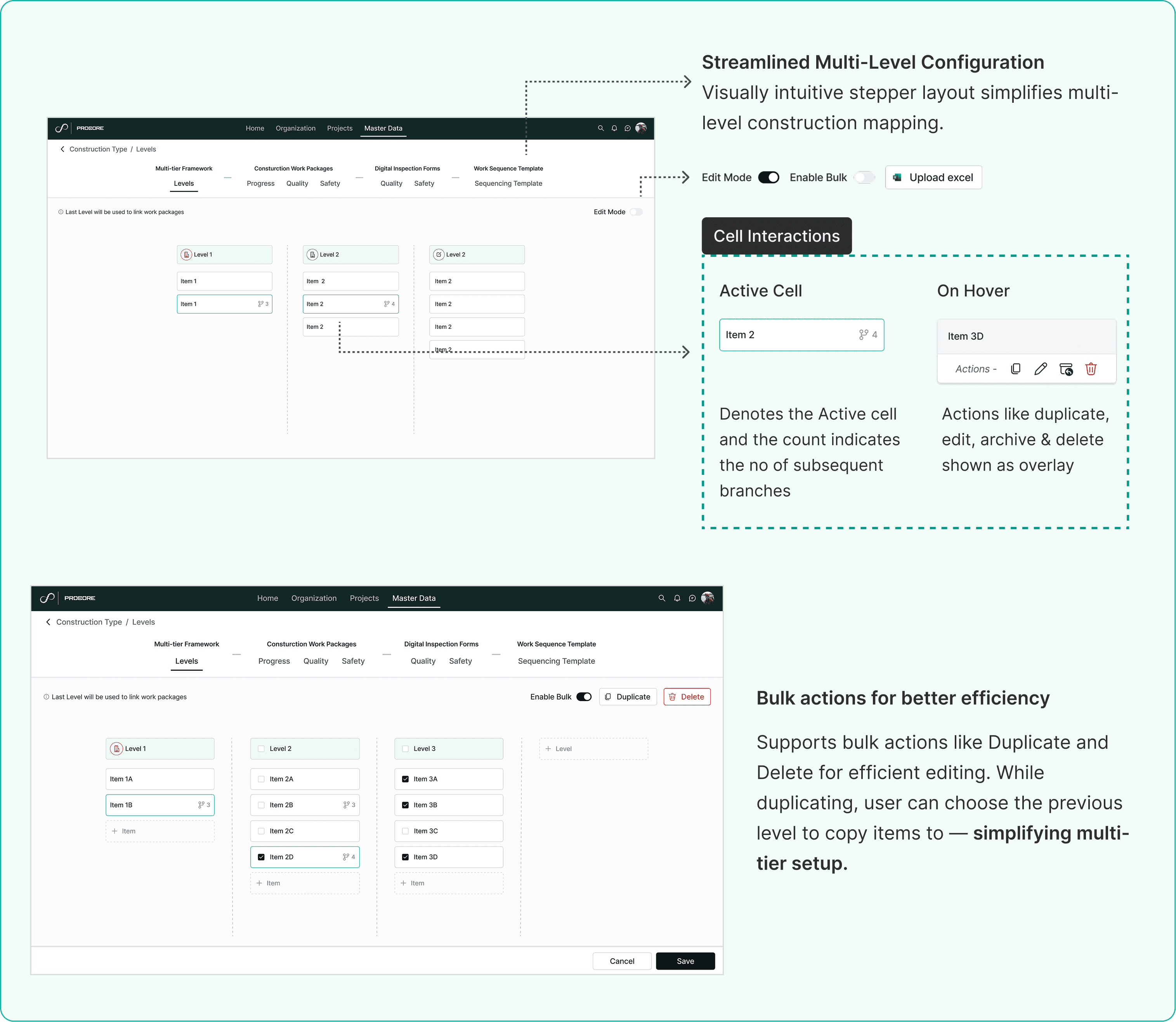
Step 2 - Define multi-tier levels
Step 2 - Define multi-tier levels
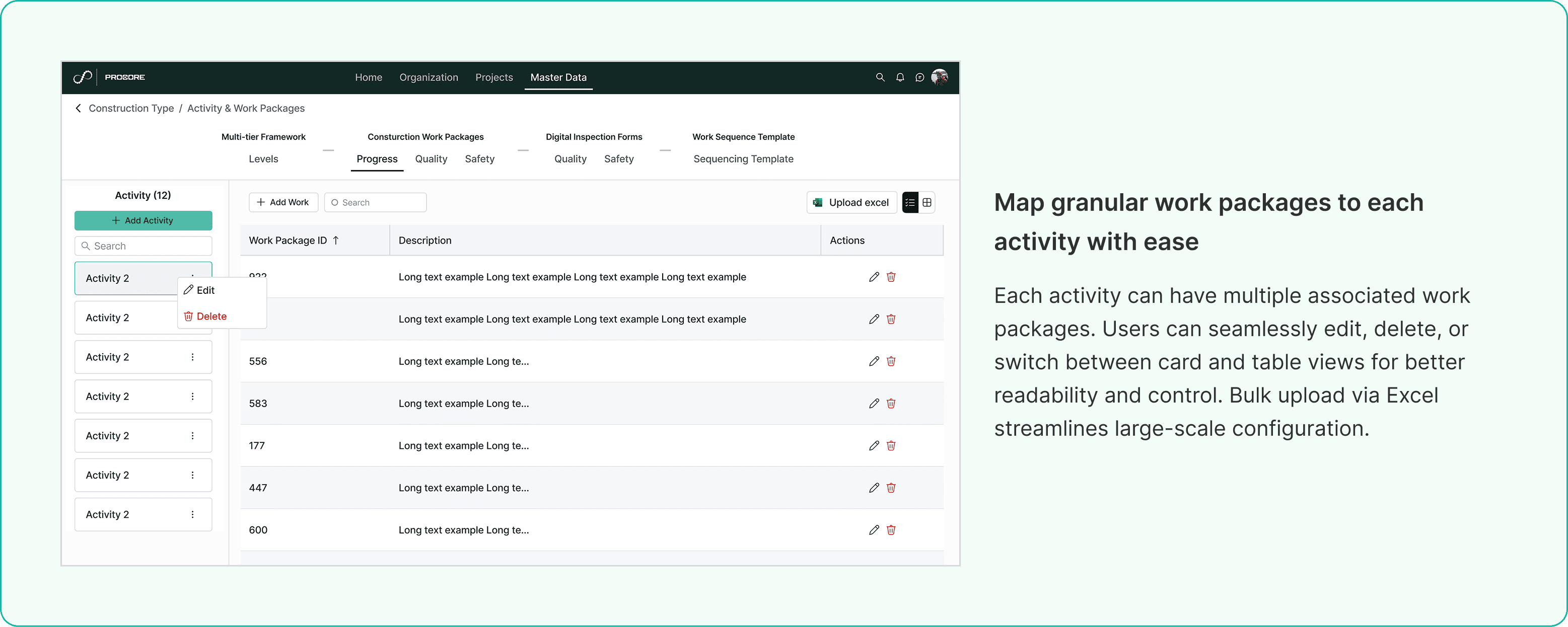
Step 3 - Add Activity and related work packages
Step 3 - Add Activity & its work packages
Step 4 - Create Sequence Templates
Step 4 - Create Sequence Templates
All of these redesign initiatives were part of a larger phased revamp strategy for the Inncircles platform. The work was carefully prioritised and planned for staggered development over upcoming quarters to ensure smooth rollout and reduce business disruption.
All of these redesign initiatives were part of a larger phased revamp strategy for the Inncircles platform. The work was carefully prioritised and planned for staggered development over upcoming quarters to ensure smooth rollout and reduce business disruption.
All of these redesign initiatives were part of a larger phased revamp strategy for the Inncircles platform. The work was carefully prioritised and planned for staggered development over upcoming quarters to ensure smooth rollout and reduce business disruption.
Validations from Testing Impact
Validations from Testing Impact
Early design reviews with internal onboarding teams confirmed the new flow addresses the top support issues (hierarchy confusion, fear of errors, lack of guidance).
The redesign has been validated with product, engineering, and business teams, and is slated for development in the upcoming quarter. All stakeholders are aligned on the roadmap and scope for launch.
Usability testing with internal teams confirmed the new structure addresses top user pain points around hierarchy confusion and fear of errors.
Early client feedback on prototypes highlighted the clarity of the new step-by-step guidance and bulk import support.
Early design reviews with internal onboarding teams confirmed the new flow addresses the top support issues (hierarchy confusion, fear of errors, lack of guidance).
The redesign has been validated with product, engineering, and business teams, and is slated for development in the upcoming quarter. All stakeholders are aligned on the roadmap and scope for launch.
Usability testing with internal teams confirmed the new structure addresses top user pain points around hierarchy confusion and fear of errors.
Early client feedback on prototypes highlighted the clarity of the new step-by-step guidance and bulk import support.
Early design reviews with internal onboarding teams confirmed the new flow addresses the top support issues (hierarchy confusion, fear of errors, lack of guidance).
The redesign has been validated with product, engineering, and business teams, and is slated for development in the upcoming quarter. All stakeholders are aligned on the roadmap and scope for launch.
Usability testing with internal teams confirmed the new structure addresses top user pain points around hierarchy confusion and fear of errors.
Early client feedback on prototypes highlighted the clarity of the new step-by-step guidance and bulk import support.
Anticipated Outcomes post release
Anticipated Outcomes post release
Improved self-service setup completion rates (from <30% to ~70%)
Reduction in manual setup by onboarding team by ~50%
Faster client time-to-value for new projects
Lower UI bug rates in table-heavy screens
Improved self-service setup completion rates (from <30% to ~70%)
Reduction in manual setup by onboarding team by ~50%
Faster client time-to-value for new projects
Lower UI bug rates in table-heavy screens
Improved self-service setup completion rates (from <30% to ~70%)
Reduction in manual setup by onboarding team by ~50%
Faster client time-to-value for new projects
Lower UI bug rates in table-heavy screens
My learnings & Reflections
My learnings & Reflections
It showed the value of collaborating deeply with PMs and SMEs to understand system constraints early & using them to shape better experience.
Perks of being new to the domain- Being new to the construction domain was both a challenge and an advantage, I brought an unbiased perspective that helped surface assumptions the team had normalised
This project reinforced for me that enterprise UX is not about redesigning legacy flows, it’s about translating complex, technical systems into understandable, usable workflows.
My biggest learning:
You don’t just design flows, you design understanding.
It showed the value of collaborating deeply with PMs and SMEs to understand system constraints early & using them to shape better experience.
Perks of being new to the domain- Being new to the construction domain was both a challenge and an advantage, I brought an unbiased perspective that helped surface assumptions the team had normalised
This project reinforced for me that enterprise UX is not about redesigning legacy flows, it’s about translating complex, technical systems into understandable, usable workflows.
My biggest learning:
You don’t just design flows, you design understanding.
It showed the value of collaborating deeply with PMs and SMEs to understand system constraints early & using them to shape better experience.
Perks of being new to the domain- Being new to the construction domain was both a challenge and an advantage, I brought an unbiased perspective that helped surface assumptions the team had normalised
This project reinforced for me that enterprise UX is not about redesigning legacy flows, it’s about translating complex, technical systems into understandable, usable workflows.
My biggest learning:
You don’t just design flows, you design understanding.